
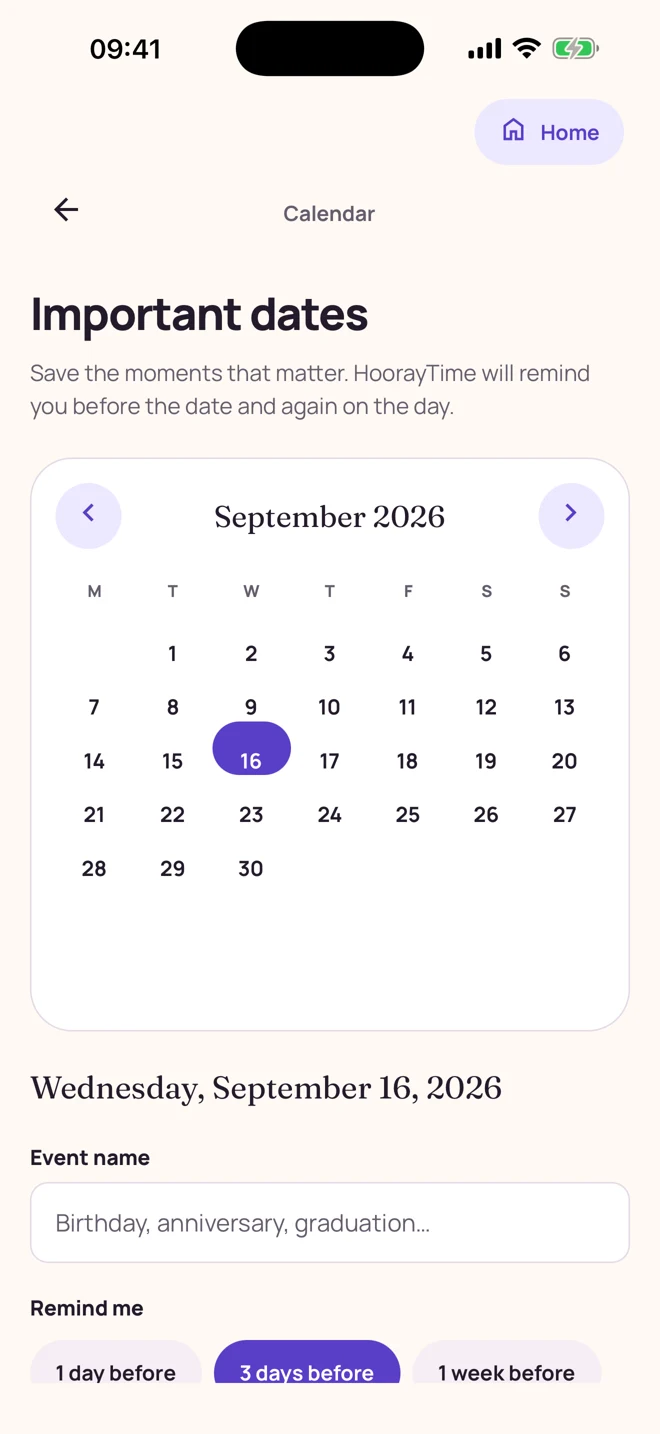
HoorayTime’s built-in calendar lets you save a named event and choose a reminder 1 day, 3 days, or 1 week before it, plus a reminder on the day. Notifications require permission. On today’s event, you can start creating a card. Events are stored on the device; annual recurrence and device-calendar synchronization are not currently supported.
Add the date before you need it
Open Calendar and select today or a future date. Give the event a name you will recognize, such as “Mum’s birthday” or “Our anniversary.” Choose how far ahead you want the reminder, then tap Save event. Allow notifications when prompted if you want the alerts.
Use one week when you want time to choose a portrait or prepare a longer message. One day can work for a simple greeting. An advance alert whose scheduled time has already passed will not be sent retroactively.
Turn a reminder into something personal
The notification opens the saved event in HoorayTime’s calendar. For an event on today’s date, the Create a card action opens the occasion picker. Choose the appropriate collection and enter the recipient’s details yourself; the event does not automatically fill a card or send one.
- Choose a portrait style or an illustrated card.
- Add a suitable reference photo if the style needs one.
- Write a greeting, or adapt a suggestion to the relationship.
- Review, generate with Pro and an available spark, then edit and share the finished image.
Understand where your dates are kept
Calendar events are stored locally on this device. They do not currently repeat every year, import birthdays from contacts, or sync with Apple Calendar or Google Calendar. Add the next occurrence when needed. Connected-account backup applies to finished creations, not to calendar events.
To remove an event, use its delete control and confirm. Removing the event also cancels its scheduled reminders.
If an alert does not arrive
Check notification permission in your device settings and confirm that the event date has not passed. The event can remain saved even when notifications are off. Device notification settings can affect delivery, so check the calendar directly for important dates.
The reminders help you remember to act. HoorayTime does not automatically create or send birthday cards.
Make this moment personal.
Create with HoorayTime. New artwork requires Pro, an available spark, and an internet connection.
Get HoorayTime